Relations
How to create a Relation
You can create new relations on the detail page of a schema.
Add a new Relation
- Go to detail page of the schema where you want to create a new relation
- Click the green plus icon next to the heading "Relations"
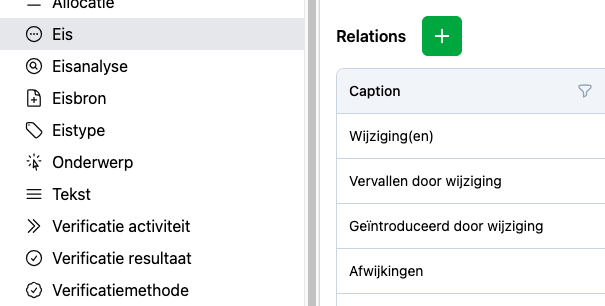
This creates a new relation and shows the Relation details
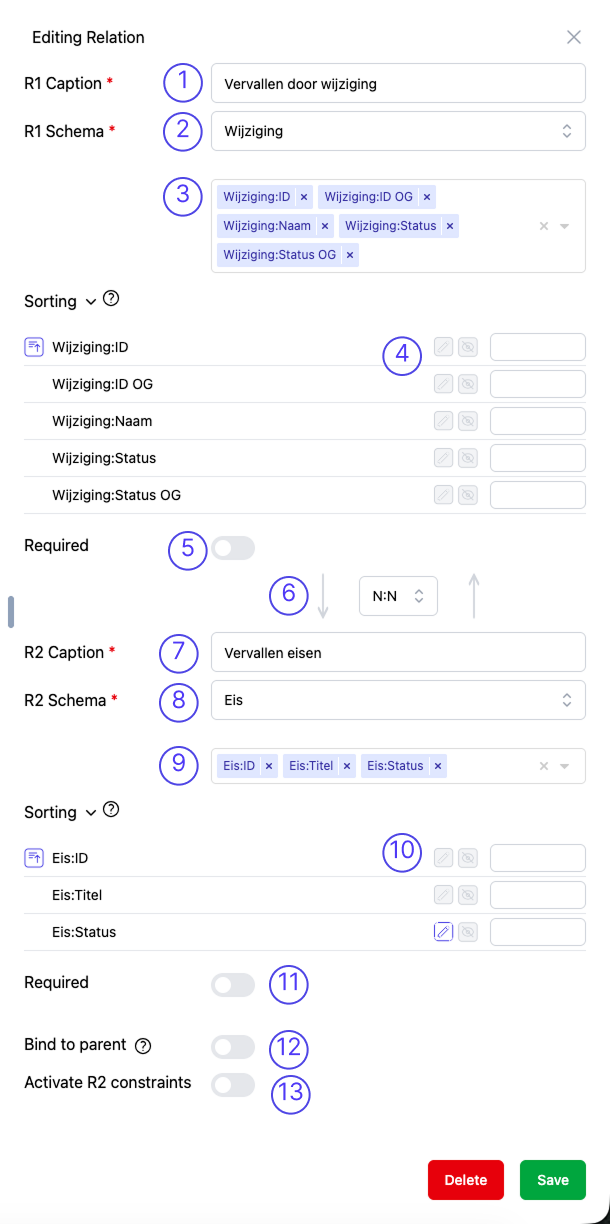
1. Set a caption how the relation is shown from R2 perspective
This caption is shown about the table on the R2 object detail page which shows this relation. It is also visible in overview tables when the R2 scheme is for instance not the root-scheme of the table. Furthermore in selections this caption is shown.
2. Select a R1 schema
Select the From (R1) of the Relation. Default the schema is selected from which the relation is created. Change it here if a different schema is desired.
Think about the direction of the relation, because it has impact on how the bind to parent / delete / lock functionality work.
3. Select the Properties which are shown to the end user of the R1 schema
Default the relation is shown on the object detail pages (instance page) of both schemas. Here can be selected what is shown in the table when showing this relation on the object detail page of the R2 schema. It is possible to also select properties of other (related) schema's.
4. Set object detail page table settings
- Enable property edit-modus (end user can modify property value).
- Set property visibility (default visible, can be set to hidden).
- Not visible in the screenshot, but also relation edit-modus can be enabled here.
5. Set or this relation is Required for creating a new R2 schema instance
When Required is enabled here, it is not possible to create a new R2 instance without selection of a R1 instance. It is therefore required to have at least one R1 instance before a R2 can be created.
6. Cardinality of relation
N:Nevery R1 instance can have multiple of this relation to a R2 instance, a R2 instance can have multiple of this relation to a R1 instance.N:1every R1 instance can only have one of this relation to a R2 instance, a R2 instance can have multiple of this relation to a R1 instance.1:Nevery R1 instance can have multiple of this relation to a R2 instance, a R2 instance can only have one of this relation to a R1 instance.1:1every R1 instance can only have one of this relation to a R2 instance, a R2 instance can only have one of this relation to a R1 instance.
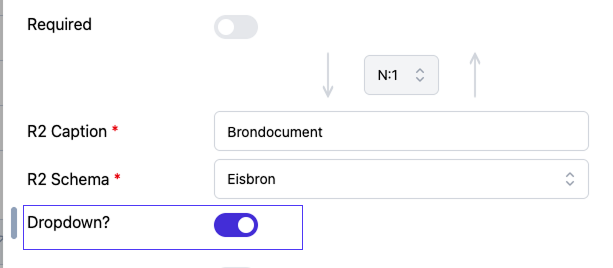
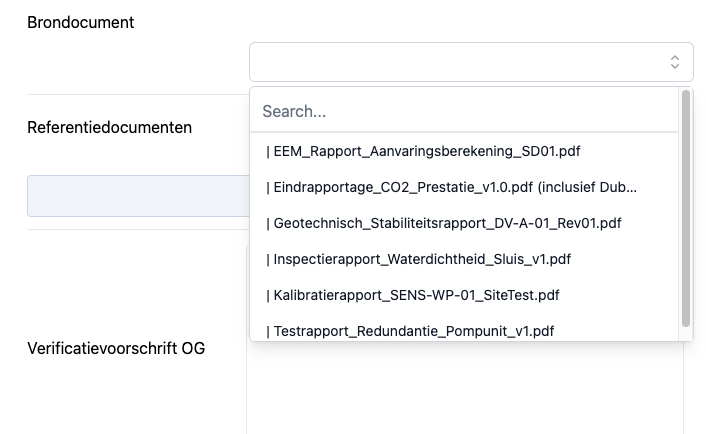
Important For N:1 relationships, you can choose to display data as a dropdown menu instead of a standard table. The set-up looks like this:
And at an object detail page it looks like this:
7. Set a caption how this relation is shown from R1 perspective
See for more information step 1.
8. Select the R2 of this relation
Select the To (R2) of the Relation.
9. Select the Properties which are shown to the end user of the R2 schema
See for more information step 3
10. Set object detail page table settings
See for more information step 4
11. Set or this relation is Required for creating a new R1 schema instance
See for more information step 5
12. Enable / disable Bind to parent
When the Bind to parent-toggle is enabled, the R2 schema instances can only exist in context of the R1 schema. When the R1 is deleted, also the R2 is deleted.
Use cases for enabling this option are Versions (R2) of Document (R1) or Text (R2) of a Requirement.
13. Constraints
Add here filters for the R2 schema selection. Only instances which comply to the filters are available for selection.
Deleting a Relation
You can delete a relation by clicking on the red "Delete"-button. An alert will be shown asking to really delete the relation.
Deleting a relation will also delete all relation instance data. This proces is irreversible!
Direction of Relation considerations
The direction of a relation has impact on certain behaviour of functionality. An instance which is selected by a relation (as To / R2) cannot be deleted. So schema instances which are created later in the process, or which are more fluid, should become the R2 of a relation.
Exception is when the relation has the Bind to parent-toggle enabled. In that case it is possible to delete a selected instance. Furthermore the deletion of the R1 is cascaded to the R2 by this relation.