Reports
Reports can be used to display data that is stored in the enviroment in a insightfull and comprehensive manner.
Setup
To build a report, the following properties need to be filled in under the General tab:
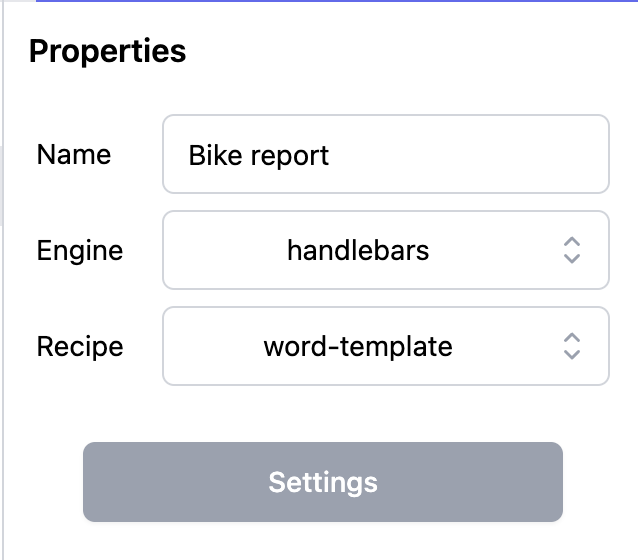
Name for the report
This is so you can easily find and recognise the report structure you make. This name is also used during generation of the report. So ensure end-users understand the naming as well.
Engine
There are five different options of engines to work with:
- Handlebars
- JsRender
- Pug
- EJS
- None
The engine choice will determine what kind of code style you have supply in code fields when building the report definition.
The engine Handlebars is the most extensive and supported engine. Default leave this setting unchanged.
Recipe
With the Recipe you define in which structure the report is defined and what kind of output is expected. Currently the following options are available.
| Recipe | Use case |
|---|---|
| chrome-pdf | Create a PDF based on html and css |
| html | Create a HTML report which can be integrated on a Page with the page report-component |
| html-to-xslx | Create an Excel file based on html and css. Default use the newer excel-template option, because it is much easier to use. |
| word-template | Create a Word or PDF based on a Word-template file written in Word self. |
| excel-template | Create an Excel based on an Excel-template file written in Excel self. |
These options are for choosing the type of file the report is generated in. After you have selected all the options, click Save.
The first 3 options (Chrome-pdf, HTML and HTML-to-XSLX) are HTML-based reports. You can find more about how these work in the section describing HTML based reports. The other two options are based on a Word or Excel file. How these work is described in the section Word or Excel based reports.
When creating a report for the first time, start with the Word-template report. It is the easiest to build and to maintain. To first three report options require some kind of programming knowlegde.
Query
Every report requires one or more Queries. Add one or more queries by pressing the Green Plus (+) button. When pressed a query can be made with the data that needs to be displayed. To view the results of the queries, press on the button next to green plus. This overview helps with the programming part.

Give the Query a unique name, which will allow to identify the generated data for usage in the report.
It is very important to follow the query structure precisely. Else the report will stay empty or, at worse, fail to generate.
More information about how querying works, can be found in the Query manual.
Instance toggle
Only one query can have the instance toggle selected. See in the table below when to use the instance toggle.
| Setting | Visibility | Use Case |
|---|---|---|
| Toggle OFF | Global Report | Used for general data overviews and standalone reporting dashboards. |
| Toggle ON | Object Detail Page | The report becomes context-aware. It will appear on the Object Detail Page of its parent Schema (e.g., the 'Person' schema). |
Word or Excel template based reports
Word and Excel reports are based on a file generated in Word or Excel. All styling definitions (and even references like table of contents) are using the Word-native functionality. This makes it very suitable for easy comply to company styling.
Template
When choosing the Word recipe, a template needs to be supplied. You can use Word or Excel for generating the template file. The leftmost green button can be used for uploading the file.

The other three buttons are for:
- Download the uploaded template file.
- Download a generated report based on the template file.
- Delete the uploaded template file.
RichText
Default the report generator will display RichText unformated in the report. When it is required to have the RichText formated, you need the following code (where input is the property name):
{{docxHtml content=input}}
When you have a RichText property which is empty, the docxHtml code will crash. Ensure you always surround the {{docxHtml}} with an if-statement. Read more about if-statements in the Handlebars section.
{{if input}}{{docxHtml content=input}}{{/if}}
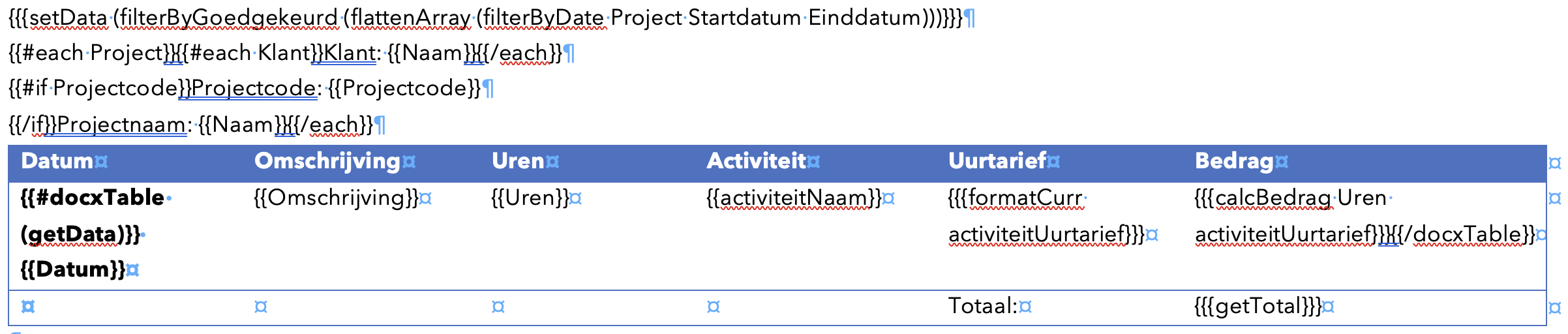
Tables
To generate a Word table-rows, add the following line of code inside the table to loop over the Array of data.
{{#docxTable Array}}{{/docxTable}}
Using a function in the context of anothere handlebars operation
{{#docxTable content=(functionName arg1 arg2)}}{{/docxTable}}
Below an example of a table in Word combining all kind of options.
Link to instance in Datastorms
For every scheme in the query default the unique URL to the instance is added to the query result. When you want to access this unique URL, you can use the following code:
{{_instanceUrl}}
For instance you can use the Word hyperlink option to set a placeholder text and fill in the instance-url in the hyperlink section.
This option is only available for the Word and Excel template recipes. For the other recipes, the instance url can be accessed by double clicking in the object structure shown in the HTML-tab.
HTML and CSS based reports
HTML based reports are very powerfull. However they require some knowledge about CSS and HTML programming at least. It is possible to use this kind of report as adition to the existing components on a page. It makes it possible to create complex graphs or tables, which are not natively supported by Datastorms.
CSS
In this tab, CSS code can be written in order to enhance your report.
HTML
In this tab, HTML code can be written in order to enhance your report. It is possible to use external libraries here, like Google Charts for instance.
Javascript
With Javascript you can enhance the functionality of the reporting module. The functions are supported by all recipes. You are able to use data from the query as well, or use parameters which are delivered from the HTML or template.
The Javascript function is called with the following code:
{{{JavascriptFuntionName}}}
It is possible to supply one or more arguments to the function. This is done by adding a space between the function name and each argument.
{{{JavascriptFuntionName Argument1 Argument2}}}
Below some date examples are stated.
function formatDateToDDMMMYYYY(dateString) {
  const date = new Date(dateString);
  if (isNaN(date)) {
    return 'Invalid date';
  }

  // Month abbreviations
  const months = [
    'JAN', 'FEB', 'MAR', 'APR', 'MAY', 'JUN',
    'JUL', 'AUG', 'SEP', 'OCT', 'NOV', 'DEC'
  ];

  const day = String(date.getDate()).padStart(2, '0');    // dd
  const month = months[date.getMonth()];                  // mmm
  const year = date.getFullYear();                        // yyyy

  return `${day} ${month} ${year}`;
}
function getDate() {
  const today = new Date();
  const day = String(today.getDate()).padStart(2, '0');
  const month = String(today.getMonth() + 1).padStart(2, '0'); // Months are 0-based
  const year = today.getFullYear();

  return `${day}-${month}-${year}`;
}
Preview
In the preview tab you can find a preview for the generated report.
Handlebar tips and tricks
Default for every report we use the Handlebars engine. Visualizing the data from the queries with Handlebars, always start with the each-statement (for instance {{#each Query}}{{/each}}).
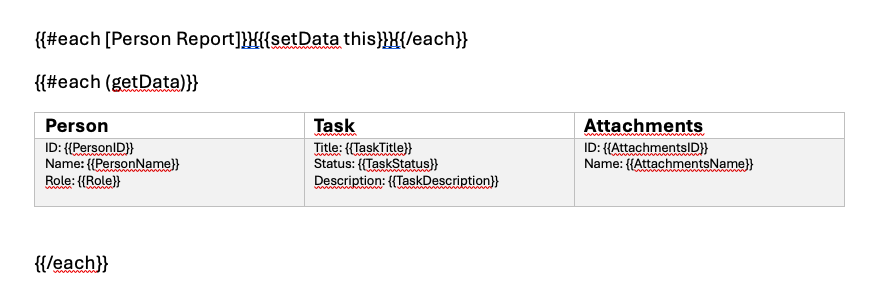
In this section we explain the mostly used Handlebars functionality. More information about Handlebars can be found on https://handlebarsjs.com/guide/.
Each-statement
Iterating over a dataset. All data is delivered as array, so you need to iterate over it.
{{#each input}}{{value}}{{/each}}
When you now there is only one item in the array, you can use the {{input.[0].value}} instead of {{#each input}}{{value}}{{/each}}.
Arrays
You can reach each element by adding .[index] to the input. For example, if you have an array of objects, you can reach the first element with .[0]. Keep in mind the index starts with 0. So the first element is .[0], the second element is .[1], and so on.
{{input.[0].value}}
{{input.[1].value}}
{{input.[2].value}}
White spacing
To prevent white-spaces on either side of the block, you can use the ~ statement. This will remove all white-spaces on the side the ~ is added.
{{#each input~}}
   {{value}}
{{~/each}}
If- and unless statement
With the if-statement you can check if there is data. If there is data, the block is rendered.
{{#if input}}{{/if}}
The unless-statement is the reverse of the if-statement. If there is no data, the block is rendered.
{{#unless input}}{{/unless}}
Showing the value of a property
{{propertyName}}
Use square brackets when calling properties with a space in the name:
{{[includes space]}}
If an "&" is used in the name of an array or property ("V&V voorschrift" for example), it is likely that JSReports will change this to "&". However, when handlebars will read the string "V&V voorschrift", it will not find any data. Therefore, change the name of this array or property to, for example, "VV voorschrift". Even better, you can use Captions mapping in the Datastorms query, to change the caption of the specific array or property. In this way, the original names in Datastorms don't have to change. (img/Captions_mapping.png)
Calling javascript functions
When defined a javascript function, use three curly brackets to call it. Possible arguments can be given with spaces behind the name.
{{{functionName arg1 arg2}}}
Comments
It can be handy to write comments in the code to explain what is happening.
{{!-- This kind of comment will always work --}}