API App client
API App clients are managed on organisation level in the Organisation settings on the API-tab.
For creation of API App client are special Admin-rights required!
Create App client
How to add new App client
Go to Organisation settings and open the API-tab. Click here on the "+"-button for creating a new App client. Give the App client a usefull name.
The secret is only shown once! Please keep it stored in a Password/Secret manager, inside Datastorms there is no option to see it again. When lost, only renewing of the secret is available.
Select the projects where API definitions are allowed to use this App client.
How to use App clients
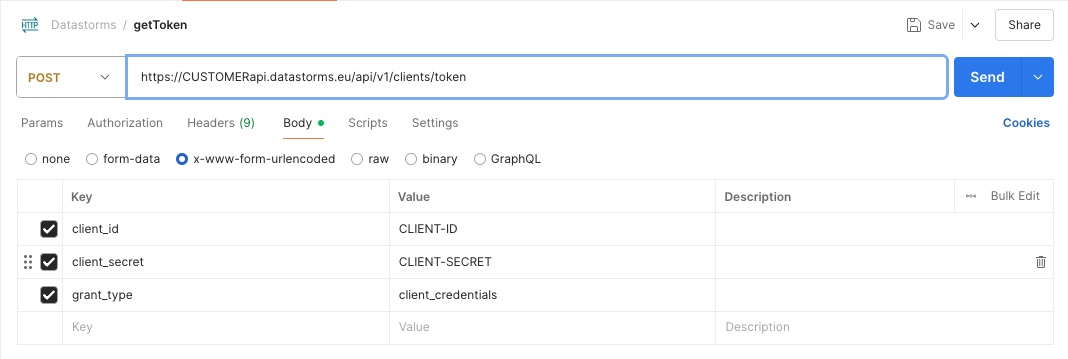
Token URL for Datastorms is [customer].datastorms.eu/api/v1/clients/token. Use this in combination with the ID and Secret to retrieve a token. See in screenshot below an example in Postman.
Renew App client secret
Use the renew option when a secret is lost or when the secret needs update because of security reasons. Go to Organisation settings and then the API-tab. Search for the App client which needs a new secret. On the detail page of the App client, click on the purple "Renew"-button on the bottom. A new secret is generated and shown.
The secret is only shown once. Do not forget to store it safely!
Revoke App client
Revoking of the App clients is done in Organisation settings. Go to Organisation settings and open the API-tab. Search for the App client to revoke. Click on the 'archive'-button which becomes visible when hovering over the name of the App client in the list. The App client is now archived and not usable anymore.
You can restore or delete archived App clients. Restored app clients are available again for usage again. Deleted App clients are irrevirsible removed.